
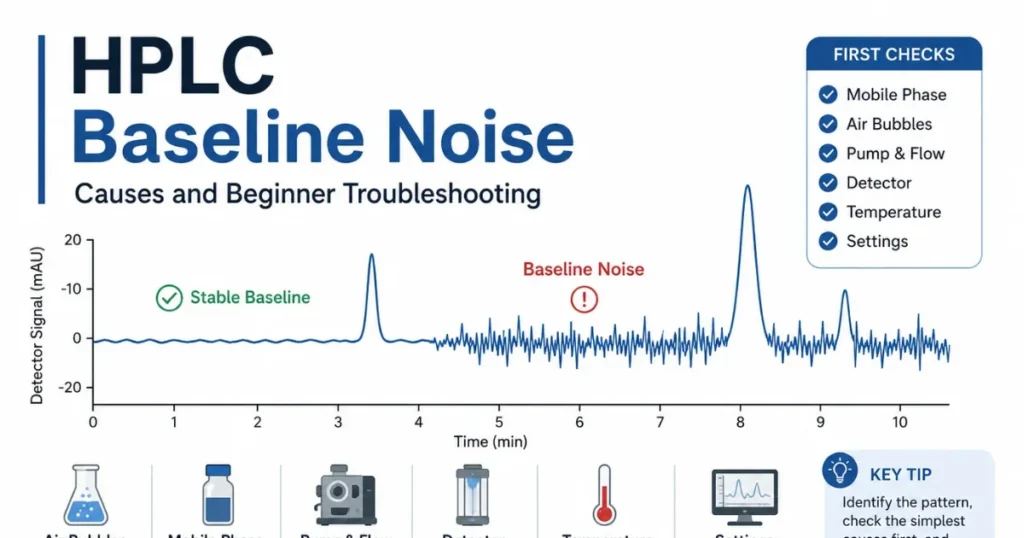
A stable baseline is one of the first signs analysts look for when reviewing an HPLC chromatogram.
When the baseline becomes noisy, small irregular movements appear even when no major compound is passing through the detector.
A small amount of detector noise is normal. However, excessive or unusual noise can make small peaks difficult to detect, interfere with peak integration, reduce signal-to-noise performance, and create uncertainty about the reliability of the chromatogram.
For many beginners, a noisy baseline immediately suggests that the detector or column is damaged.
But baseline noise may come from several different sources, including the mobile phase, air bubbles, pump pulsation, detector flow cell, temperature, electrical interference, column condition, or method settings.
The correct first step is not to replace a major instrument component. The correct first step is to identify the pattern of the baseline problem and check the simplest possible causes.
This article explains what HPLC baseline noise means, how it differs from drift and spikes, the most common causes, and the first troubleshooting checks a beginner should perform.
What Is HPLC Baseline Noise?
The baseline is the detector signal observed when no major analyte peak is passing through the detector.
Ideally, it should remain reasonably stable and smooth throughout the chromatographic run.
Baseline noise refers to small, rapid, and usually random fluctuations around the normal baseline signal.
These fluctuations may appear as a rough or irregular line instead of a smooth baseline.
Every detector produces some background noise. Therefore, a perfectly flat baseline is not always expected.
The important question is whether the noise is normal for the method or large enough to affect:
- Small peak detection
- Peak integration
- Signal-to-noise calculations
- Limit of detection
- Limit of quantitation
- Impurity reporting
- System suitability
- Result reproducibility
There is no single universal noise value that is acceptable for every HPLC method.
The acceptable level depends on the detector, wavelength, mobile phase, method sensitivity, response time, data rate, analytical purpose, and validated method requirements.
Is It Noise, Drift, Spikes, or Ripple?
Not every unstable baseline should be described simply as baseline noise.
The shape and pattern of the disturbance can provide useful information about its possible source.
Random Baseline Noise
Random noise appears as rapid, irregular fluctuations without a clear repeating pattern.
Possible causes include mobile phase contamination, air bubbles, detector instability, a dirty flow cell, electrical interference, or unsuitable detector settings.
Baseline Drift
Baseline drift is a gradual movement of the baseline upward or downward over time.
It may be related to temperature changes, insufficient equilibration, gradient composition changes, column contamination, solvent evaporation, or detector warm-up.
Baseline Spikes
Spikes are sudden, sharp, and usually isolated changes in the detector signal.
Possible causes include small air bubbles, particles passing through the detector flow cell, electrical interference, injection disturbances, or temporary pump problems.
Repeating Waves or Ripple
A regularly repeating baseline pattern may be associated with pump pulsation, solvent proportioning, temperature cycling, or another repeating mechanical or environmental source.
Determining whether the disturbance is random, gradual, sudden, or repetitive is one of the most useful first troubleshooting observations.
Why Is a Stable Baseline Important?
A stable baseline helps the data system distinguish real chromatographic peaks from background signal.
This is particularly important when the method measures small impurity or degradation peaks.
Excessive baseline noise may cause:
- Small peaks to become difficult to detect
- Noise to be integrated as false peaks
- Incorrect peak start and end points
- Unstable peak area measurements
- Poor signal-to-noise results
- Difficulty comparing chromatograms
- Failure of method or system suitability requirements
- Uncertainty near reporting or quantitation limits
A noisy baseline does not automatically mean that every result is invalid.
The analyst must determine whether the noise exceeds the normal method behavior and whether it affects the peaks or calculations being reported.
New to HPLC? Start with the Free Starter Kit
Download a practical beginner-friendly PDF guide to help you understand HPLC fundamentals, common problems, and what to check first.
Download the Free Starter KitCommon Causes of HPLC Baseline Noise
1. Air Bubbles and Inadequate Degassing
Air bubbles are one of the most common causes of unstable detector signals.
Dissolved gas may leave the mobile phase because of temperature changes, pressure changes, poor degassing, or air entering the solvent lines.
If a bubble reaches the detector flow cell, it may cause:
- Random baseline noise
- Sudden spikes
- Temporary signal loss
- Large baseline disturbances
- Unstable detector energy
Air may enter the system because of:
- An empty or nearly empty solvent reservoir
- Solvent inlet tubing positioned above the liquid level
- Loose solvent-line connections
- Incomplete pump priming
- Poor mobile phase degassing
- Leaking pump seals or check valves
- Gas forming inside the flow cell
The first checks should include the solvent level, inlet tubing, degassing system, pump priming, pressure stability, and visible bubbles in the outlet line.
The pump and detector should be purged or flushed according to the instrument procedure.
2. Contaminated or Poor-Quality Mobile Phase
The mobile phase passes continuously through the detector. Any contamination that absorbs at the selected wavelength may increase the detector background or create noise.
Possible mobile phase problems include:
- Low-purity solvent
- Contaminated laboratory water
- Old buffer solution
- Microbial growth in aqueous mobile phase
- Particles inside the mobile phase
- Contaminated glassware
- Impure buffer salts or additives
- Solvent stored in an unsuitable container
- Cross-contamination from previous mobile phases
The appearance of a mobile phase does not always confirm that it is clean.
A clear solution may still contain UV-absorbing contamination or very small particles.
If the baseline problem started after preparing a new mobile phase, the preparation should be one of the first areas investigated.
Use the correct HPLC-grade solvents and follow the approved procedures for mobile phase preparation, filtration, degassing, pH adjustment, and storage.
3. Pump Pulsation or Unstable Flow
The HPLC pump should deliver the mobile phase at a stable and reproducible flow rate.
If the pump produces pressure or flow fluctuations, the detector baseline may show repeating waves, cyclic noise, or irregular disturbances.
Possible pump-related causes include:
- Air inside the pump head
- Incomplete pump priming
- Contaminated or damaged check valves
- Worn pump seals
- Solvent inlet restriction
- Incorrect solvent compressibility settings
- Poor solvent mixing
- Pump maintenance problems
Compare the baseline pattern with the pressure trace.
If baseline waves appear at the same time as pressure fluctuations, the pump or solvent-delivery system should be investigated.
Reviewing the pressure behavior can help distinguish detector noise from a flow-related problem. See the guide to HPLC pressure problems for additional checks.
4. Mobile Phase Mixing or Proportioning Problems
When the HPLC system mixes solvents using different pump channels, unstable proportioning may produce small changes in mobile phase composition.
These changes can appear as baseline noise, waves, or drift, especially when the solvents have different UV absorbance.
Possible causes include:
- Air in one solvent channel
- Incorrect solvent-channel assignment
- Poorly operating proportioning valve
- Inadequate mixer performance
- Partially blocked solvent filter
- Immiscible or poorly mixed solvents
- Incorrect gradient table
For an isocratic method, a useful approved troubleshooting comparison may be made between instrument-mixed mobile phase and properly premixed mobile phase.
If the premixed mobile phase produces a more stable baseline, the proportioning or mixing system may require further investigation.
5. Dirty or Contaminated Detector Flow Cell
The detector flow cell is the area where light passes through the mobile phase before the signal is recorded.
Contamination inside the flow cell can reduce light transmission and create excessive noise, drift, or unstable detector energy.
Possible sources of flow-cell contamination include:
- Buffer salt deposits
- Particulate matter
- Strongly retained sample components
- Previous mobile phases
- Microbial contamination
- Precipitation caused by incompatible solvents
Flow-cell contamination may be suspected when the baseline remains noisy after the mobile phase, pump delivery, and air bubbles have been checked.
Do not open or disassemble the detector without following the instrument manual and laboratory procedure.
The flow cell should be flushed or cleaned only with compatible solvents and according to the manufacturer’s instructions.
6. Detector Lamp Instability or Insufficient Warm-Up
UV and PDA detectors require a stable light source.
If the lamp has not reached stable operating conditions, the baseline may drift or fluctuate during the beginning of the run.
Lamp-related considerations include:
- Insufficient detector warm-up time
- Low lamp energy
- An aging lamp
- Incorrect lamp installation
- Detector diagnostic warnings
- Temperature instability inside the detector
A lamp should not be replaced immediately based only on a noisy baseline.
Air bubbles, a dirty flow cell, contaminated mobile phase, and unstable flow may produce symptoms that appear similar to a lamp problem.
Review the detector energy, lamp hours, diagnostic results, and instrument history before replacing the lamp.
7. Wavelength and Mobile Phase Absorbance
The selected detector wavelength has a strong effect on baseline behavior.
At lower UV wavelengths, many solvents, buffers, additives, and contaminants absorb more strongly.
This can increase background absorbance and make the baseline appear noisier.
Possible wavelength-related problems include:
- Using a wavelength close to the solvent UV cutoff
- Using strongly absorbing mobile phase additives
- Incorrect reference-wavelength settings
- Very narrow optical bandwidth
- Incorrect detector method
- Using a wavelength with low lamp energy
The analyst should confirm that the wavelength matches the approved analytical method.
Do not change the wavelength only to make the chromatogram look smoother when working with a validated method.
Any method change must follow the applicable laboratory and validation procedures.
8. Temperature Instability
Temperature changes can affect the mobile phase, column, detector, and refractive properties of the flowing liquid.
Possible temperature-related causes include:
- Air-conditioning cycles
- Direct sunlight on the instrument
- Instrument located near a door or air vent
- Column oven cycling
- Detector temperature changes
- Cold mobile phase entering a warm system
- Insufficient system stabilization
Temperature effects may appear as slow drift or repeating baseline waves.
Allow the mobile phase, detector, column compartment, and complete HPLC system to reach stable operating conditions before evaluating the baseline.
9. Column Contamination or Insufficient Equilibration
The column may release retained contamination or late-eluting compounds into the detector.
This can produce baseline disturbances, broad humps, drift, or additional background signals.
Column-related causes include:
- Strongly retained sample components
- Column contamination
- Inadequate column washing
- Column bleed under unsuitable conditions
- Incorrect storage solvent
- Incompatible mobile phase
- Insufficient equilibration
- Contaminated guard column
If the baseline gradually improves after continued mobile phase flow, insufficient equilibration may be involved.
If the disturbance appears only when a particular HPLC column is installed, the column and guard-column history should be reviewed.
Column flushing must follow the column manufacturer’s solvent compatibility and pH recommendations.
10. Electrical Interference and Detector Settings
Not every baseline problem originates in the liquid flow path.
Electrical or data-acquisition conditions may also affect the recorded signal.
Possible causes include:
- Improper instrument grounding
- Loose signal connections
- Electrical equipment operating nearby
- Unstable power supply
- Radio-frequency interference
- Incorrect detector response time
- Excessively high data-acquisition rate
- Incorrect signal or sensitivity settings
A very fast response-time setting may display more high-frequency noise than a slower setting.
However, changing response time or data rate may also affect narrow peak shape and peak measurement.
Detector settings should therefore match the approved method and instrument recommendations.
Gradient Baseline Changes
A gradient method changes the mobile phase composition during the run.
If solvent A and solvent B have different absorbance at the selected wavelength, the baseline may move upward or downward as the gradient composition changes.
This does not always indicate instrument failure.
A gradient-related baseline change may depend on:
- Solvent absorbance
- Buffer concentration
- Mobile phase additives
- Wavelength
- Solvent purity
- Column bleed
- Gradient mixing
- System equilibration
Run the approved gradient blank and compare its baseline with previous acceptable blank chromatograms.
A repeatable gradient baseline pattern may be part of the method, while a new, irregular, or increasing disturbance should be investigated.
First Checks for HPLC Baseline Noise
When excessive baseline noise is observed, use a logical sequence instead of changing several components at the same time.
1. Confirm That the Noise Is Abnormal
Compare the current chromatogram with:
- Previous acceptable runs
- Previous blank injections
- System suitability chromatograms
- The same method and wavelength
- The same detector scale
Zooming the vertical scale excessively can make normal detector noise appear severe.
2. Identify the Pattern
Determine whether the disturbance is:
- Random
- Repeating
- Gradually drifting
- Sharp spikes
- Present throughout the run
- Present only during the gradient
- Present only after injection
3. Run or Review the Blank
A blank chromatogram helps determine whether the disturbance comes from the system or from the sample.
If the blank is also noisy, investigate the mobile phase, pump, column, detector, and system conditions.
If the blank is stable but the sample chromatogram is disturbed, investigate sample preparation, sample solvent, matrix, injection, and carryover.
4. Review Pressure Behavior
Check whether the pressure is:
- Stable
- Pulsating
- Higher than normal
- Lower than normal
- Changing at the same time as the baseline
A matching pressure and baseline pattern often indicates a flow-delivery problem.
5. Check the Mobile Phase
Confirm:
- Correct solvent identity
- Correct solvent grade
- Correct buffer concentration
- Correct pH
- Correct mobile phase ratio
- Proper filtration and degassing
- No visible particles or microbial growth
- No excessive solvent evaporation
6. Prime and Purge the System
Inspect the solvent lines for air and confirm that every active pump channel is properly primed.
Purge the pump and flush the detector according to the instrument procedure.
Continue until solvent delivery is stable and no bubbles are visible in the appropriate outlet line.
7. Allow Sufficient Warm-Up and Equilibration
Confirm that:
- The detector has completed its required warm-up
- The column oven has reached the set temperature
- The mobile phase is flowing steadily
- The column has been sufficiently equilibrated
- The baseline has had enough time to stabilize
8. Verify Detector Settings
Review:
- Wavelength
- Reference wavelength
- Bandwidth
- Response time
- Data rate
- Detector sensitivity
- Lamp status
- Detector energy
9. Review Recent Changes
Ask whether the problem began after:
- Preparing a new mobile phase
- Changing the column or guard column
- Changing the lamp
- Performing pump maintenance
- Changing detector settings
- Moving the instrument
- Changing the method
- A long system shutdown
The most recent change often provides the strongest troubleshooting clue.
10. Change One Variable at a Time
Do not replace the mobile phase, column, lamp, flow cell, pump seals, and method settings at the same time.
Changing multiple variables may temporarily remove the problem, but it prevents identification of the actual cause.
A systematic analyst changes one factor, observes the result, and documents the finding.
Quick Troubleshooting Table
| Observation | Possible Cause | First Check |
|---|---|---|
| Random baseline noise | Air bubbles, contaminated solvent, dirty flow cell, or detector instability | Check mobile phase, degassing, bubbles, and detector status |
| Repeating baseline waves | Pump pulsation, solvent mixing, or temperature cycling | Compare the baseline pattern with pressure and temperature behavior |
| Sharp isolated spikes | Small air bubbles, particles, or electrical interference | Purge the system and inspect the mobile phase and electrical connections |
| Noise started after fresh mobile phase | Solvent, buffer, preparation, contamination, or degassing problem | Recheck the complete mobile phase preparation |
| Noise increases at a low wavelength | High mobile phase absorbance or unsuitable wavelength | Verify solvent cutoff, additives, and approved wavelength |
| Baseline and pressure fluctuate together | Air in the pump, check-valve problem, pump seals, or unstable flow | Prime the pump and review the pressure trace |
| Baseline gradually stabilizes | Insufficient detector warm-up or column equilibration | Continue stabilization and compare repeat blank runs |
| Baseline changes during a gradient | Different solvent absorbance, mixing, or column bleed | Run the approved gradient blank and compare previous runs |
| Blank stable but sample disturbed | Sample solvent, matrix, injection, or sample contamination | Review sample preparation and compare standard and sample runs |
Common Beginner Mistakes
A common mistake is assuming that any visible fluctuation means the detector is damaged.
Other beginner mistakes include:
- Replacing the column immediately
- Replacing the detector lamp before checking bubbles and mobile phase
- Judging noise using an excessively expanded detector scale
- Ignoring pressure fluctuations
- Using old buffer or mobile phase
- Starting injections before detector warm-up is complete
- Ignoring the blank chromatogram
- Changing several variables at the same time
- Changing detector settings outside the approved method
- Failing to document when the noise first appeared
Troubleshooting becomes much easier when the analyst knows exactly when the disturbance started and what changed immediately before it appeared.
A Practical Troubleshooting Example
Imagine that an isocratic HPLC method normally produces a smooth and stable baseline.
After preparing a new buffered mobile phase, the analyst observes strong random baseline noise.
The main observations are:
- The baseline is noisy before the first injection
- The blank chromatogram is also noisy
- The pressure is stable
- The retention time remains reasonably consistent
- The noise started immediately after changing the mobile phase
In this situation, the analyst should not immediately replace the column or detector lamp.
The first checks should include:
- Water and solvent quality
- Buffer age and purity
- Mobile phase filtration
- Mobile phase degassing
- Cleanliness of the preparation glassware
- Correct solvent and buffer concentrations
- Presence of bubbles in the solvent lines
A new mobile phase is then prepared using clean glassware, fresh HPLC-grade solvents, fresh buffer materials, proper filtration, and proper degassing.
The system is flushed and allowed to stabilize.
If the baseline returns to its normal condition, the problem was related to the mobile phase or its preparation rather than the column or detector lamp.
This example shows why the timing of the problem is an important troubleshooting clue.
When Should the Problem Be Investigated Further?
Further investigation or instrument support may be required when:
- Baseline noise exceeds the method requirement
- Signal-to-noise requirements fail
- Small peaks cannot be integrated reliably
- The problem continues with fresh mobile phase
- Pressure remains unstable after proper priming
- Detector energy or lamp diagnostics fail
- The flow cell repeatedly develops bubbles
- Visible leakage is suspected
- Electrical interference continues
- A validated method no longer performs consistently
Review the method, instrument logbook, maintenance records, previous blank chromatograms, detector diagnostics, and recent system changes.
Instrument components should be cleaned, repaired, or replaced only according to the laboratory procedure and manufacturer’s instructions.
Key Lesson
HPLC baseline noise is a symptom, not a diagnosis.
It may result from:
- Air bubbles
- Poor degassing
- Contaminated mobile phase
- Pump pulsation
- Unstable solvent mixing
- A dirty detector flow cell
- Detector lamp instability
- Wavelength or detector settings
- Temperature changes
- Column contamination
- Electrical interference
Start by identifying whether the disturbance is random noise, drift, spikes, or a repeating pattern.
Then check the blank, pressure, mobile phase, bubbles, warm-up, equilibration, and detector settings.
A systematic investigation is usually more effective than immediately replacing the column, lamp, or detector component.
Frequently Asked Questions
What causes baseline noise in HPLC?
HPLC baseline noise may be caused by air bubbles, poor mobile phase quality, pump pulsation, unstable solvent mixing, flow-cell contamination, detector lamp instability, temperature changes, column contamination, electrical interference, or incorrect detector settings.
What is the difference between baseline noise and baseline drift?
Baseline noise appears as small, rapid fluctuations around the baseline. Baseline drift is a gradual movement of the baseline upward or downward over time.
Can air bubbles cause HPLC baseline noise?
Yes. Air bubbles inside the pump, tubing, or detector flow cell may cause random noise, sharp spikes, signal disturbance, and unstable pressure.
Can the mobile phase cause a noisy baseline?
Yes. Contaminated solvents, old buffer, poor-quality water, inadequate degassing, particles, incorrect mixing, and strongly absorbing additives may increase baseline noise.
Does a noisy baseline mean the detector is damaged?
Not necessarily. The detector is only one possible source. Mobile phase quality, bubbles, pump behavior, column condition, temperature, and method settings should be checked first.
How much baseline noise is acceptable?
There is no single acceptable value for every HPLC method. The acceptable noise depends on the detector, wavelength, method sensitivity, signal-to-noise requirements, system suitability criteria, and laboratory procedure.
Ready to Go Beyond the Basics?
Continue your learning with the complete 17-part HPLC Practical Guide series designed for beginners, junior analysts, fresh graduates, and QC laboratory starters.
Build practical confidence in HPLC fundamentals, system components, chromatographic results, troubleshooting, QC readiness, and realistic laboratory cases.
Explore the Complete 17-Part Series